Hub-Spoke Workflows#
GTlab’s data processing is based on a hub–spoke architecture.
The hub represents the central data repository, where all project data is stored and managed.
The spokes are the individual tools that read, analyze, and process this data.
Because all tools access the same project data and data models, they “speak the same language.” This eliminates the need for custom interfaces or converters between tools, ensuring consistent, reliable, and efficient data exchange.
This concept can be visualized as a wheel: the hub contains the data, while the spokes represent the connected tools that interact with it.
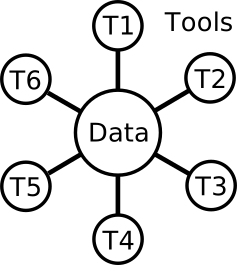
In a hub–spoke workflow, all process elements act on the project data, potentially modifying it one after another.
Hierarchy of Workflow Elements#
Within this architecture, workflow elements are organized hierarchically:
Default Tasks: Higher-level elements that coordinate the process flow. Typical examples include loops, optimizers, and design of experiments (DOEs).
Default Calculators: Lower-level elements that perform the actual simulations, data modifications, or other computations.
Data Handling#
During workflow execution, data communication takes place on a temporary copy of the project data, which acts as the central information point. Each process element modifies this temporary copy as the workflow progresses.
If the workflow completes successfully, the temporary modifications are then applied back to the project data.
If additional workflow-related parameters need to be exchanged between different calculators, this can be achieved via the Connection Editor. For example, in a looped workflow, the iteration step can be passed on to subsequent elements using this editor.
The following section illustrates how to build a workflow.